Lesson 4: Building Your First LP Position
🎯 Core Concept: Start Simple, Start Safe
Your first LP position should be a learning experience, not a high-stakes gamble. This lesson walks you through setting up a safe, profitable position on Uniswap V2 (the simplest version) that minimizes risk while teaching you the mechanics.
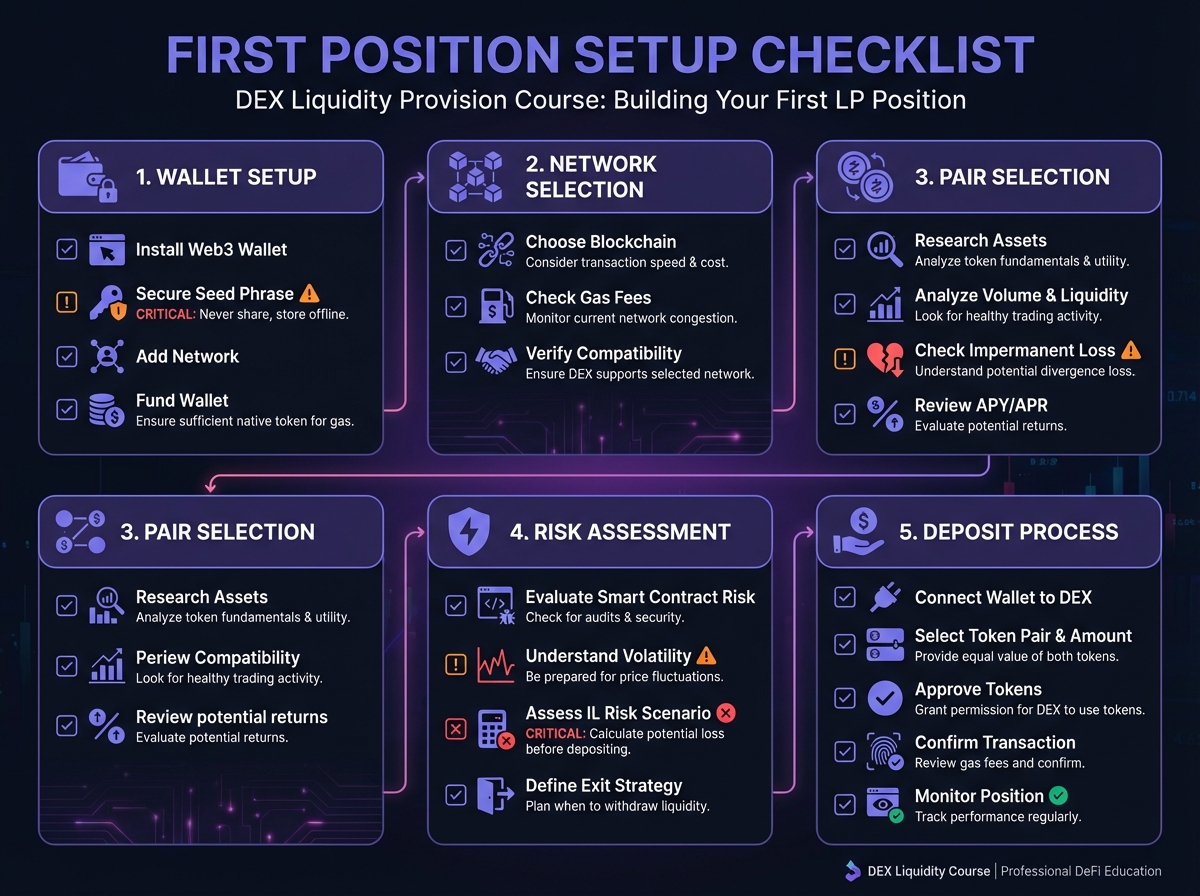
The First-Time LP Checklist
Before you deposit a single token, ensure you:
✅ Understand impermanent loss (Lesson 3)
✅ Have calculated expected fees vs. IL
✅ Chosen a low-risk pair (stablecoins or correlated assets)
✅ Have funds on Layer 2 (for lower gas costs)
✅ Know how to withdraw (practice on testnet first!)
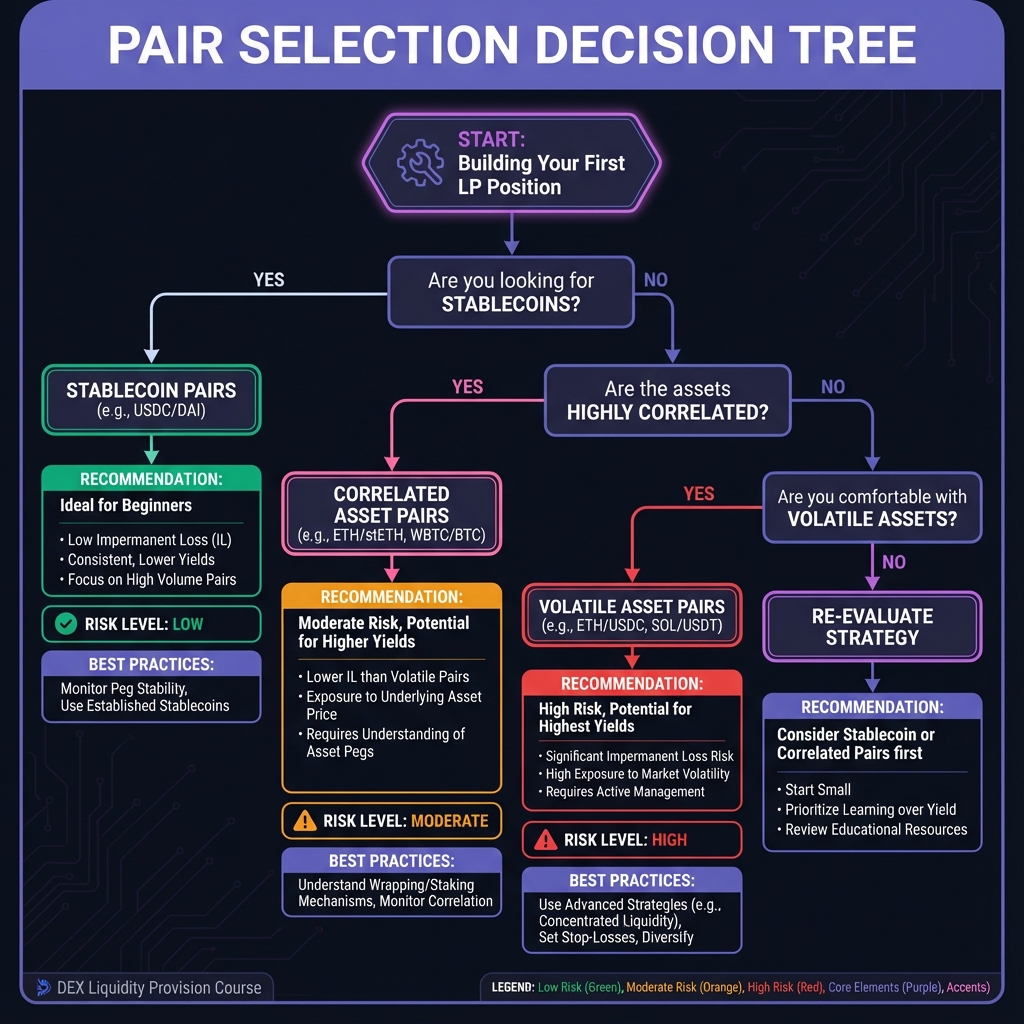
🏁 Step 1: Choose Your Pair Wisely
Beginner-Friendly Pairs (Lowest Risk)
Tier 1: Stablecoin Pairs ⭐ Best for beginners
USDC/USDT
DAI/USDC
USDC/USDT.e (on L2s)
Why: Minimal IL (<0.1%), consistent fees, low volatility
Tier 2: Correlated Pairs ⭐⭐ Good for learning
wstETH/ETH (wrapped staked ETH)
WBTC/ETH
ETH/BTC (on some DEXs)
Why: Ratio stays relatively stable, manageable IL
Tier 3: Blue Chip Pairs ⭐⭐⭐ Moderate risk
ETH/USDC
BTC/USDC
Why: Higher volatility = higher IL risk, but more fees
Avoid for First Position:
❌ Meme coins
❌ New tokens
❌ Low-liquidity pairs
❌ Uncorrelated volatile pairs
Pair Selection Framework
Ask yourself:
What's the historical volatility?
Check price charts
High volatility = high IL risk
What's the correlation?
Do prices move together?
Higher correlation = lower IL
What's the trading volume?
More volume = more fees
Check DEX analytics (Dune, DefiLlama)
What's the liquidity depth?
Deeper pools = less price impact
Check TVL (Total Value Locked)

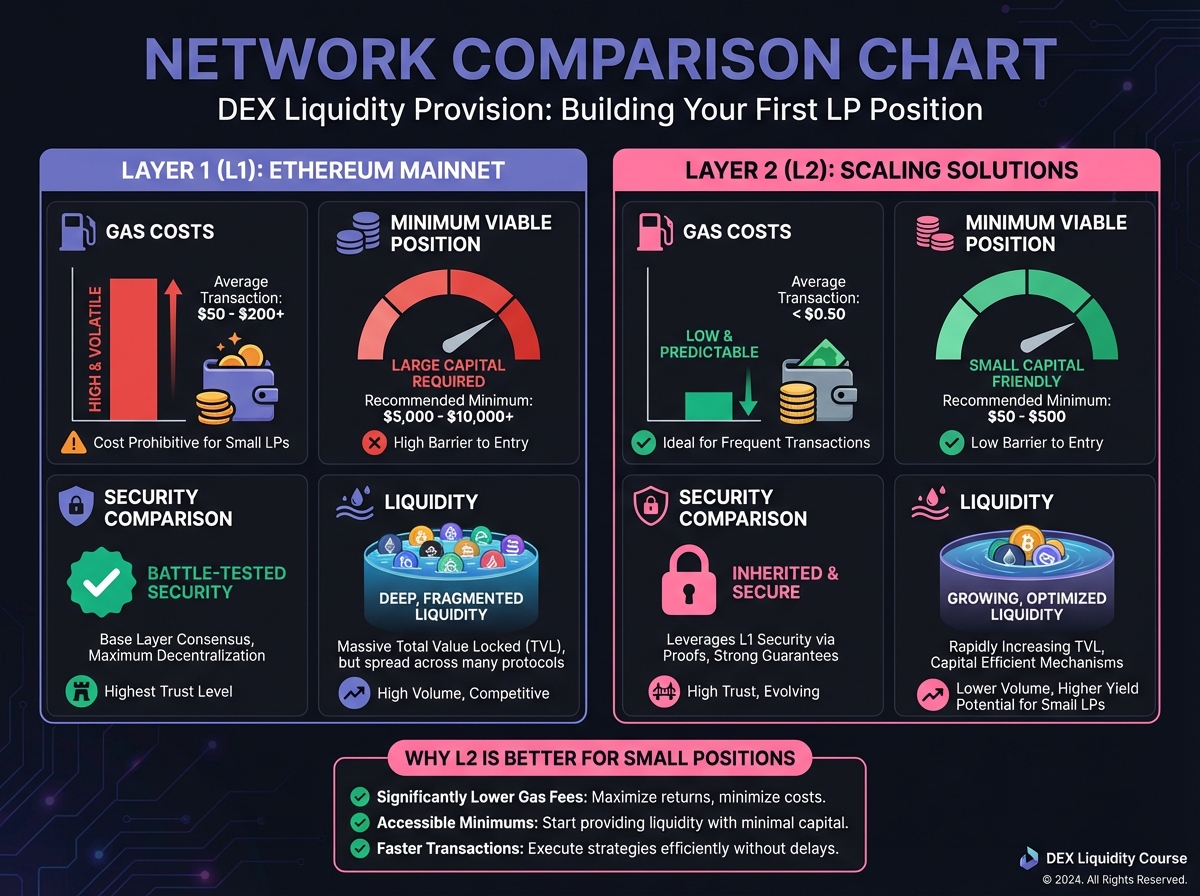
🌐 Step 2: Choose Your Network
Layer 2 vs. Layer 1
Ethereum Mainnet (L1):
❌ High gas costs ($50-200 per transaction)
❌ Only viable for large positions ($50k+)
✅ Highest security
✅ Most liquidity
Layer 2 Solutions (Recommended for beginners):
✅ Low gas costs ($0.10-1.00 per transaction)
✅ Viable for small positions ($100+)
✅ Same security (inherited from L1)
✅ Growing liquidity
Recommended L2s for LPing
Arbitrum:
Gas: ~$0.20 per transaction
Liquidity: High (most L2 liquidity)
Uniswap V2 and V3 available
Optimism:
Gas: ~$0.15 per transaction
Liquidity: Good
Uniswap V2 and V3 available
Base:
Gas: ~$0.10 per transaction
Liquidity: Growing rapidly
Aerodrome (ve-token model) available
Polygon:
Gas: ~$0.01 per transaction
Liquidity: Very high
Multiple DEXs available
Recommendation: Start on Arbitrum or Optimism for best balance of liquidity and low fees.

💰 Step 3: Calculate Your Position Size
The 1% Rule (Beginners)
Never risk more than 1-5% of your portfolio on your first LP position.
Example:
Portfolio: $10,000
First position: $500 (5%)
This limits your downside while you learn
Minimum Viable Position
On L2 (low gas):
Minimum: $100-500
Recommended: $1,000-5,000
Optimal: $5,000-25,000
On L1 (high gas):
Minimum: $25,000 (gas costs eat small positions)
Recommended: $50,000+
Optimal: $100,000+
Position Size Calculator
Formula:
Position Size = (Portfolio × Risk %) - (Gas Costs × Expected Transactions)Example:
Portfolio: $10,000
Risk: 5% = $500
Expected gas (L2): $5 for deposit + $5 for withdraw = $10
Position size: $490
🔧 Step 4: Set Up Your Wallet
Required Setup
Install MetaMask (or similar wallet)
Download from official site only!
Set up seed phrase securely
Never share your seed phrase
Add L2 Network
Arbitrum: Chain ID 42161
RPC: https://arb1.arbitrum.io/rpc
Or use Chainlist.org (auto-adds networks)
Bridge Funds to L2
Use official bridges (Arbitrum Bridge, Optimism Gateway)
Or use third-party bridges (Orbiter, Stargate)
Never use unknown bridges!
Get Test Tokens (Optional but recommended)
Use testnet first (Goerli, Sepolia)
Practice depositing/withdrawing
Understand the interface
Security Checklist
✅ Hardware wallet for large amounts
✅ Separate wallet for DeFi (not your main wallet)
✅ Revoke unused token approvals (use Revoke.cash)
✅ Never share private keys
✅ Verify contract addresses before interacting

📱 Step 5: Navigate Uniswap Interface
Finding the Pool
Go to app.uniswap.org
Click "Pool" in the top menu
Click "New Position" (V3) or "Add Liquidity" (V2)
For Your First Position: Use V2
Why V2 for beginners:
Simpler interface
No range selection needed
Lower complexity
Easier to understand
V2 Interface:
Select token pair (e.g., USDC/USDT)
Enter amount for one token
Interface auto-calculates the other token
Review the details
Click "Add Liquidity"
Understanding the Interface
Key Information Displayed:
Pool Share: Your % of total liquidity
Fee Tier: 0.05% for stablecoins, 0.3% for volatile
Price Range: Full range (0 to ∞) for V2
Estimated Fees: Based on historical volume
Review Before Confirming:
✅ Token amounts are correct
✅ Pool share is reasonable (>0.01% for small positions)
✅ Gas estimate is acceptable
✅ You understand the risks
💸 Step 6: Execute Your Deposit
Pre-Deposit Checklist
Transaction Steps
Approve Tokens (first time only)
Click "Approve USDC" (or first token)
Confirm in wallet
Wait for confirmation
Approve Second Token
Click "Approve USDT" (or second token)
Confirm in wallet
Wait for confirmation
Add Liquidity
Click "Add Liquidity"
Review transaction details
Confirm in wallet
Wait for confirmation (~30 seconds on L2)
Receive LP Tokens
You'll receive LP tokens (ERC-20 on V2)
These represent your share
Store them safely (they're your proof of ownership)
Gas Optimization Tips
Batch approvals: Approve both tokens in one session
Use L2: 100x cheaper than L1
Time your transactions: Gas varies (usually lower on weekends)
Set gas limit: Don't let wallet auto-set (can be too high)
📊 Step 7: Monitor Your Position
What to Track
Daily:
Current pool price
Your LP token value
Fees earned (increases LP token value)
Weekly:
IL calculation (compare to holding)
Fee earnings vs. IL
Whether to rebalance or withdraw
Monthly:
Total return (fees - IL - gas)
Comparison to just holding
Strategy adjustments
Monitoring Tools
Uniswap Interface:
View your positions in "Pool" tab
See current value and fees
Analytics Platforms:
APY.vision: Track PnL, IL, fees
Revert Finance: Backtest ranges, analyze positions
Zapper.fi: Portfolio view across protocols
Manual Calculation:
Track entry price
Calculate current IL
Compare to holding value
🔄 Step 8: Withdrawing Your Position
When to Withdraw
Good reasons:
✅ IL exceeds fees (losing money)
✅ Better opportunities elsewhere
✅ Need the capital
✅ Price moved significantly (large IL)
Bad reasons:
❌ Temporary price dip (wait for recovery)
❌ FOMO on another opportunity (do research first)
❌ Panic (emotional decisions lose money)
Withdrawal Process
Go to Uniswap Pool interface
Find your position
Click "Remove Liquidity"
Choose amount (100% or partial)
Review what you'll receive
Confirm transaction
Receive tokens back to wallet
Note: You'll receive both tokens back, not necessarily in the ratio you deposited (due to IL and price changes).
🎓 Beginner's Corner: Common First-Time Mistakes
Mistake 1: Depositing too much
Fix: Start small (1-5% of portfolio)
Mistake 2: Choosing volatile pairs
Fix: Start with stablecoins
Mistake 3: Ignoring gas costs
Fix: Use L2, calculate total costs
Mistake 4: Not tracking IL
Fix: Use analytics tools, calculate weekly
Mistake 5: Panic withdrawing
Fix: Set rules, stick to them
Mistake 6: Not understanding fees
Fix: Read Lesson 2, calculate expected fees
Mistake 7: Using L1 for small positions
Fix: Always use L2 for positions <$25k
🔬 Advanced Deep-Dive: Optimizing Your First Position
Fee Tier Selection
For Stablecoins:
Use 0.01% tier (if available)
Or 0.05% tier
Never use 0.3% (traders will bypass you)
For Volatile Pairs:
Use 0.05% for high volume
Use 0.3% for moderate volume
Use 1% only for very volatile/exotic pairs
Volume/TVL Ratio Analysis
Calculate:
Volume/TVL Ratio = Daily Volume ÷ Total Value LockedInterpretation:
Ratio > 0.5: Excellent (high fees per dollar)
Ratio 0.1-0.5: Good
Ratio < 0.1: Poor (low fees, avoid)
Example:
Pool TVL: $10,000,000
Daily Volume: $2,000,000
Ratio: 0.2 (Good)
Timing Your Entry
Best Times:
After large price movements (IL already occurred)
During low volatility periods
When volume is increasing
Worst Times:
Right before major events (high volatility expected)
During extreme volatility
When volume is declining
📈 Real-World Example: Complete First Position
Setup:
Network: Arbitrum
Pair: USDC/USDT
Position: $1,000 (50% USDC, 50% USDT)
Fee Tier: 0.05%
Execution:
Bridge $1,100 to Arbitrum (extra for gas)
Swap to get 500 USDC + 500 USDT
Approve both tokens (~$0.50 gas)
Add liquidity (~$0.50 gas)
Receive LP tokens
Monitoring (After 1 month):
Fees earned: ~$2 (0.2% of position)
IL: ~$0.10 (minimal for stablecoins)
Net return: $1.90 (0.19% monthly = 2.3% APY)
Gas costs: $1.00 (one-time)
Analysis:
✅ Profitable (fees > IL + gas)
✅ Low risk (stablecoin pair)
✅ Good learning experience
Decision: Continue position, or move to V3 for higher efficiency (Lesson 5).
🎯 Key Takeaways
Start with stablecoins on L2 for lowest risk
Use V2 for your first position (simpler)
Risk only 1-5% of portfolio initially
Monitor IL weekly using analytics tools
Calculate fees vs. IL before depositing
Practice on testnet before using real funds
Use L2 to minimize gas costs
🚀 Next Steps
Congratulations! You've set up your first LP position. In Module 2, we'll explore:
Uniswap V3 concentrated liquidity (higher efficiency, more complexity)
Multi-protocol strategies
Advanced fee optimization
Professional risk management
Complete Exercise 4 to document your first position and track its performance.
Remember: Your first position is for learning. Start small, start safe, and track everything. The experience you gain is worth more than the fees you'll earn.
← Back to Summary | Next: Exercise 4 → | Previous: Lesson 3 ←
Last updated